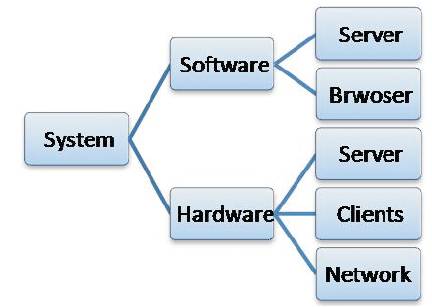
Figure 1. System Hierarchy in two Perspectives (Software and Hardware)
Today, people are more interested in efficiency, speed and more importantly in cost, in every walk of life. The management of work, industries, trade etc. which is called "Office work" is one of these. The office work may include saving information on paper in an ordered manner such that it may return to them in future. In order to overcome the difficulty in managing paper inventory and difficulty in searching for a particular document, the authors have designed and implemented an archiving system to save the burden of hard copies. The requirements had been first identified by analyzing the work nature. Upon these requirements for both the manager and user sides, the system was designed by creating a facility for each requirement, which in overall comprises the system. The designed system is easy, simple and web based. It was designed primarily based on XAMPP application and PHP language.
In the era we live in, a lot of things come digitally and electronically. Paper and solid ( physical existence) existence of these things are not any more found except the device that hold the soft representation of the object. The new era has benefits that save space, ease of processing data, ease of sharing data and information to others and security that could be provided to them. This motivation led the engineers and scientists to think in converting things into digital format. One of these things is the archiving register used by a Secretary.
Some software companies have interest in archiving data and information and provide systems and platforms. One of them is "GRAU DATA" which offers cost-efficient solutions for secure, long-term and audit-compliant archiving of data in accordance with legal requirements, regardless of the hardware or archive applications as well as is a communication platform for secure and worldwide data exchange. [1]. It provide several products, and these products are scalable from one terabyte up to several petabytes.
Another solution is provided by Open Text. Open Text provides agile and web friendly electronic output archiving solutions. It is designed for large organizations. One of its benefits is the cost saving [2]
Storage pipes provide a data archiving service. It's a good solution for saving data for a long time. [3]
If one looks thoroughly, it can be noticed that these systems and ser vices are designed for large organizations, huge data and long term savings. The aim of the project is to design simple, easy to use, web based archiving system with different access privileges to different employees.
The next section will discuss the system idea and the design that supports such a system. Then the implementation of each part of the system is introduced. Finally, the outcomes of the project and conclusions from these outcomes are stated.
The proposed way to solve the archiving problem with speed and efficiency is to use digital technique (i.e. the computers) because it can perform many processes in very short time and this can be confirmed when comparing with manual labor. The methodology used in system design is shown in the next section which describes the system components and the functions that it can provide, and classifies these components to software and hardware. The software is further divided into database and the interface components. Depending on each part function one can identify the tool (i.e. the computer language or the program) that could be used. Comprehensive, correct and accurate analysis of the system leads to better performance and efficiency of the system.
The system consists of two main parts: software and hardware. Each one of them is further divided into sub elements as shown in Figure 1.
Figure 1. System Hierarchy in two Perspectives (Software and Hardware)
As hardware components, the system requires a site that saves the files and provides data retrieval service(server), clients who access the server and benefit from services that are provided by the server, and finally the network that connects the system components with each other.
The Software Components or elements consist of server and browser. The simplest is the browser; there are variety products of browser like IE, Chrome, Opera, Mozilla Fire Fox etc.
The server side or component in soft hierarchy is divided further into two parts, the data base part that holds the information and does operations on records in this data base like reading, writing, updating, sorting etc. This is implemented via XAMPP server application; XAMPP is free cross- platform application, Developed by Apache. Its main features are that it is free, its ease of installation and that it contains MySQL, PHP and Perl Programming [4] , [5]. The second part is the link between database and end user browser, this is achieved using PHP programming.
PHP is a widely-used open source general-purpose scripting language that is especially suited for web development and can be embedded into HTML. The code is executed on the server, and it generates HTML which is then sent to the client. The client would receive the results of running that script, but would not know what the underlying code was [6]. The server structure is as shown in Figure 2.
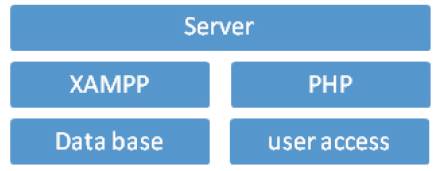
Figure 2. Server Structure
The PHP codes and features are seen from [7] and [8]
In this system it is supposed that each item (letter) has the following fields (columns): No. , date, title, from, to, and link to letter location in the server PC. There are three users in this system. One is the manager (represents the secretary) and he can add new records and search for old ones. The other two users cannot add records, just search or browse for existing ones. These users are mentioned as user#1 (represents the head of department and/ or the dean) and user#2 who represents the other staff. User#1 has the feature to update the letter image; he can download it, add a comment on the image using any program like Paint, and re-upload it again.
There are many pages in this system, so it is not a good practice to have a screenshot for every single page in the system. Here the authors will describe the pages in a sequence and if found necessary it will be shown in context.
The first page contains two links, for manager and user. From user's link one goes to departments page and then to the login page as shown in Figure 3.
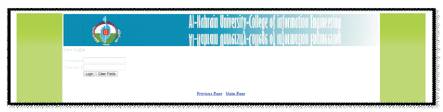
Figure 3. Login Page
In the next page there are two choices, one is logout and the other is "Click here to go to the Document page". If user chooses the second one, the system will direct him to the secured page as shown in Figure 4.
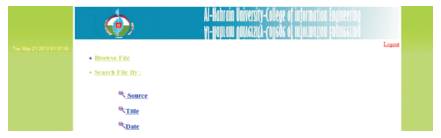
Figure 4. User features
When clicking on the management icon, the system will direct to the administrator page and ask for a username and password to provide the user administrative features as shown in Figure 5.

Figure 5. Admin control panel
When the Admin want to add user account he should click on the Add user account icon and choose for which department he wants them added. After the choice is made, the admin should provide the username and password of the new user account and click the add button as shown in Figure 6 below.
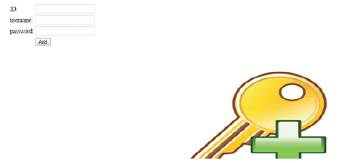
Figure 6. Add user
If the Admin wants to add official letters to the system, he should click on the add file icon and choose for which branch of the system he wants to add the file. After this process is done, he must provide information as to which system is needed to determine the official letters and after that the file needs to be uploaded (official letter) as shown in figures 7 and 8.
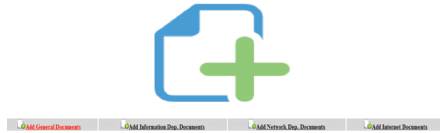
Figure 7. Select Department
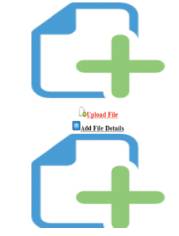
Figure 8. Add File
The third part of Admin control panel is for the add admin account, and after clicking on the icon it directs to the account information page, the information can be added and add button clicked as shown in figure below.
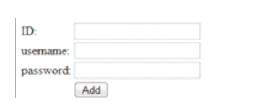
Figure 9. Add Admin Account
Sniffers can be used both for legitimate network management functions and for stealing information off a network. Unauthorized sniffers can be extremely dangerous to a network's security because they are virtually impossible to detect and can be inserted almost anywhere. This makes them a favorite weapon in the hacker's arsenal [9]. When using the POST Method in authenticating form, the authenticating information is visible, and when using the Get Method in authenticating form, the authenticating information cannot be seen.
This project provides simple, easy and low cost system to archive letters in a small / medium sized organization. Only a single PC is needed to be a server, this PC is the secretary’s PC itself, and no other extra component is needed. The web front of the system makes it user friendly. The POST method used with username and password is not secured. When sniffing with wire shark program the username and password are available and shown to the hacker, so using Get method is more secure.